
AI Marketing Calendar for Founders: Editable Briefs, Review in Minutes
By Vora IQ Team
How an AI marketing calendar creates editable briefs, preserves brand memory, and cuts review to minutes. Workflow steps and a Vora IQ example.
- ai marketing calendar

An AI marketing calendar is a dynamic planning layer that drafts post ideas, dates, and briefs using a brand context layer, not a spreadsheet with cells to fill. Treat every entry it generates as an editable card, not a finished asset. The winning workflow pairs those AI drafts with a human approval gate, a practice both industry marketing-ops guidance and Vora IQ’s own roadmap tools build around.
TL;DR:
- AI marketing calendars generate campaign logic, content pillars, and platform-specific drafts, reducing manual strategy effort.
- They rely on a persistent context layer that tracks brand voice, past performance, and evolving priorities for consistent output.
- Human approval gates are essential to catch tone or factual issues before content reaches publishing, especially for larger teams or strict compliance.
- Successful implementation requires feeding the system clear goals, key examples, and current priorities, then iterating based on engagement data.
- Tools with full campaign generation, easy integrations, and editable briefs are better suited for small teams needing speed and flexibility.
Table of Contents
- What an AI Marketing Calendar Actually Replaces
- Key Features and Use Cases of AI-Powered Calendars
- How to Build and Run an AI Marketing Calendar
- How Do You Choose the Right AI Calendar Tool?
- How Vora IQ Implements an AI Marketing Calendar
- When Should You Adopt an AI-First Calendar?
- Try Vora IQ’s Approach to AI Marketing Planning
- Sources
What an AI Marketing Calendar Actually Replaces
A static template gives you a grid. A scheduler tool gives you a queue. An AI marketing calendar gives you both, plus the thinking that used to happen in a strategy meeting. It pulls from your brand voice, past post performance, and campaign goals to generate a working draft, then hands you cards you can accept, edit, or kill.
That distinction matters because most teams already own a scheduling tool. What they lack is the layer above it: something that decides what to post before anyone opens a design file. An AI content calendar fills that gap by producing:
- Themed content pillars tied to a launch, season, or evergreen topic
- Draft captions and hooks adapted per platform (a LinkedIn post reads differently than a TikTok script)
- Suggested posting cadence based on prior engagement patterns
- Editable briefs that a designer or writer can expand without starting from zero
Free templates from tools like Airtable automate the grid and auto-fill dates, which helps with organization but stops short of generating the actual strategy. An AI-native planner goes further: it proposes the campaign logic, then lets you edit before anything ships.
Key Features and Use Cases of AI-Powered Calendars
Good AI calendar tools do more than spit out captions. Here’s what to expect from a capable one:
- Idea and pillar generation. The system proposes content pillars from your positioning and repurposes a single long-form piece into five or six platform-specific posts.
- Multi-platform adaptation. A single idea gets rewritten for Instagram, X, and email without you retyping it three times.
- Campaign-specific planning. Product launches, seasonal pushes, and always-on evergreen content each get their own cadence logic, not one generic weekly slot.
- Brief and asset generation. Beyond captions, the better tools draft video scripts, image prompts, and short-form copy variants ready for a designer to build from.
- Collaborative review and export. Cards move through approval, then push to your scheduler or CMS through calendar and social API integrations.
User review data on platforms like G2 consistently shows that calendar views, integrations, and export options rank among the top reasons teams pick one marketing suite over another. Idea generation alone rarely wins loyalty. It’s the export and approval mechanics that determine whether a team keeps using the tool past month one.
Pro Tip: Run your first AI-generated week through a “voice check” pass before publishing anything. Read every card aloud. If it doesn’t sound like your brand talking, that’s the calendar’s context layer telling you it needs more examples to learn from.
How to Build and Run an AI Marketing Calendar
Start with inputs, not output. Feed the system your quarterly goals, three to five content pillars, a short brand brief (voice, banned terms, competitor positioning), and five examples of your best-performing past posts. Skip this step and you’ll get generic drafts that need a full rewrite anyway.
From there, the workflow runs in a loop:
- Generate a first draft calendar, typically two to four weeks of cards at once.
- Review and edit each card against brand voice and current priorities.
- Expand approved cards into briefs with copy, visual direction, and a call to action.
- Schedule and export to your publishing tool or CMS.
- Measure engagement and conversion against your prior baseline.
- Iterate, feeding results back into the context layer so future drafts improve.
Put your approval gate right after step 2, before anything reaches a brief. This is where a human-in-the-loop process earns its keep, catching tone drift or factual slips before they cost you a client email or a public post.
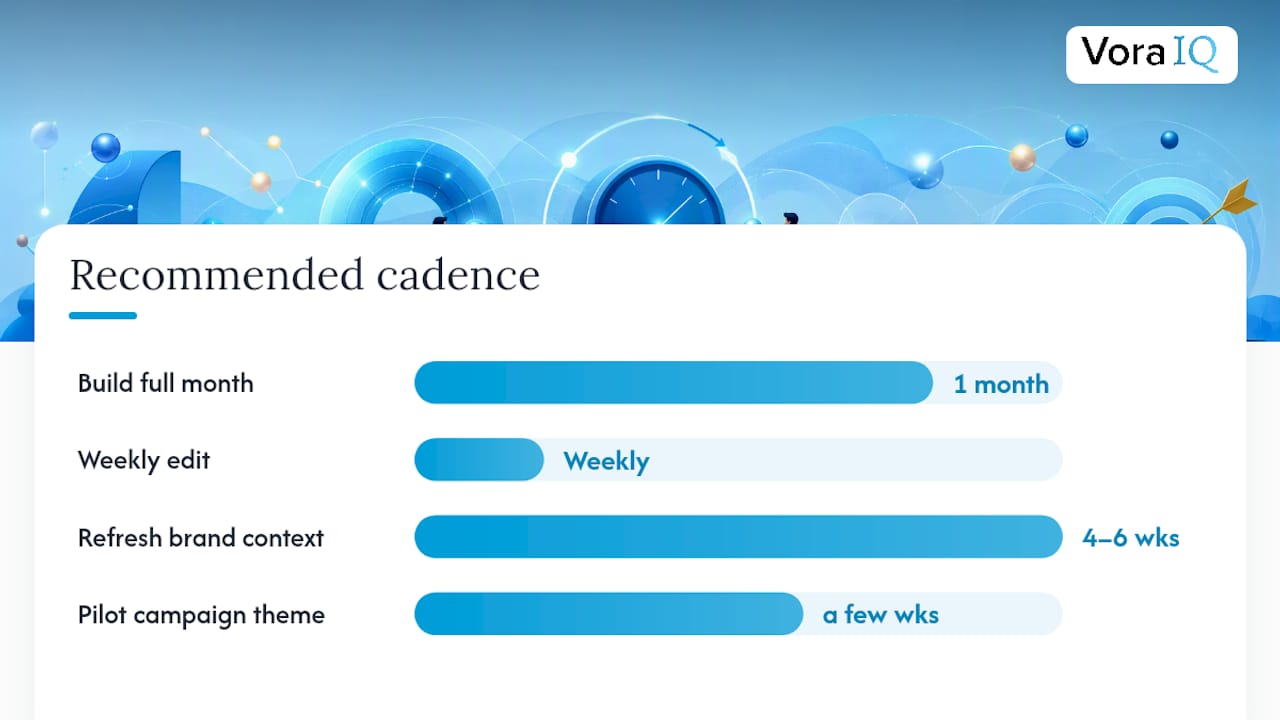
A workable cadence: build a full month at once, then run a short weekly editing session to adjust for what’s actually landing. Refresh your brand context and top-performing examples every four to six weeks so the system isn’t working off stale data. Many teams pilot the whole approach on a single campaign theme for a few weeks before rolling it out further, which keeps risk low while you learn what the tool does well.
How Do You Choose the Right AI Calendar Tool?
Not every AI calendar tool solves the same problem, and picking by brand name instead of category is how teams end up disappointed. Four broad categories exist:
- Template plus AI fill — a structured grid with AI-suggested captions dropped into cells. Fast, but shallow strategy.
- Calendar-first planners — dedicated apps built around scheduling with AI features layered on top.
- AI-native operating systems — tools with a persistent context brain that remembers your brand, generates full campaigns, and produces editable cards and briefs from that memory.
- Scheduler-only tools — no generation at all, just a queue and a publish button.
Match the category to your situation, then run this checklist against any specific tool:
- Does it retain brand context between sessions, or does every prompt start from scratch?
- Does it integrate with your CMS, social APIs, and analytics, or does it live in isolation?
- Does it generate full briefs, or only short captions?
- Is there a real approval gate, or does it auto-publish by default?
- How is pricing structured, and what data does it store or share?
A solo founder juggling three platforms needs less than an agency running twelve client accounts. Complexity and budget should scale together, not separately when weighing categories.
How Vora IQ Implements an AI Marketing Calendar
Vora IQ builds its calendar output on a persistent context layer, not a one-off prompt. That context brain tracks your brand voice, past campaigns, and roadmap priorities so calendar cards reflect where your business actually stands, an approach that aligns with findings on AI systems that use ongoing brand memory instead of resetting with every request.
In practice, that looks like:
- Roadmap-linked content pillars that shift automatically as your business priorities change
- Editable cards that expand into full briefs, ready for a writer or designer to finish
- A social media agent that carries your brand context across every platform-specific draft it produces
- Export paths that hand off scheduled content without forcing a manual rebuild
Vora IQ provides unique roadmaps tailored to founders’ business contexts rather than generic templates.
The goal isn’t a calendar that runs itself unsupervised. It’s a calendar that starts smarter, so your review pass takes minutes instead of hours.
When Should You Adopt an AI-First Calendar?
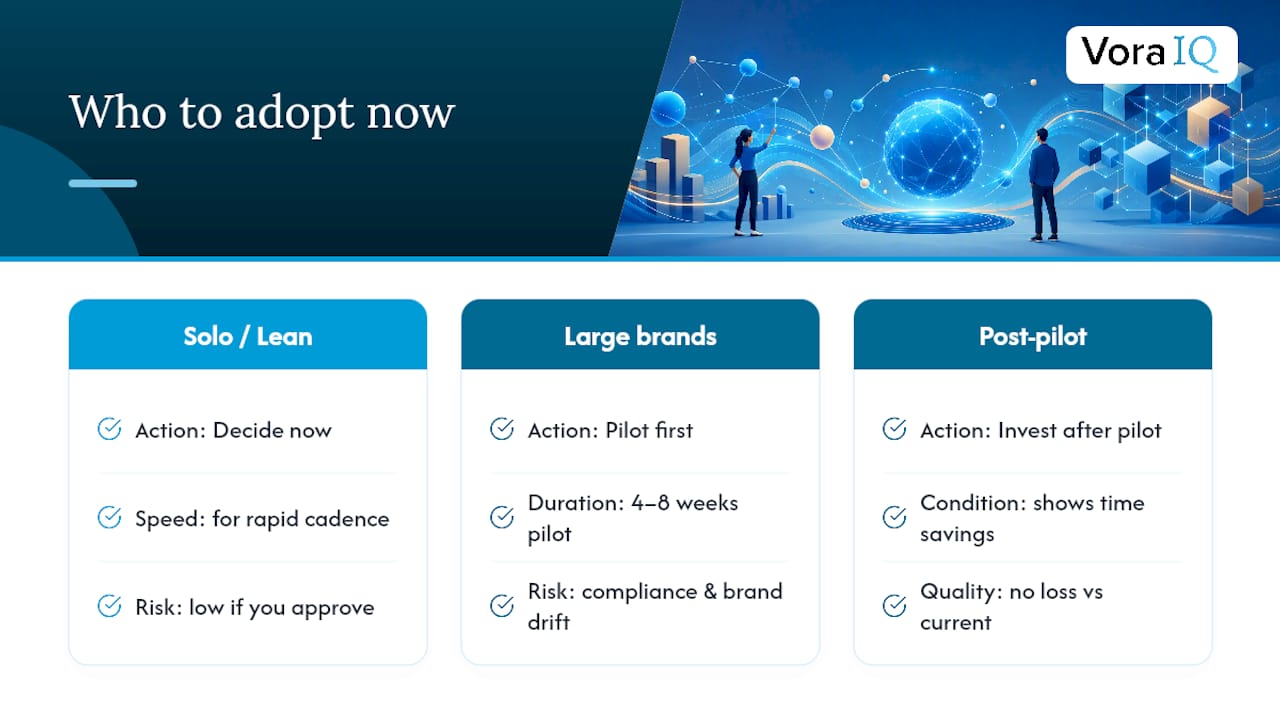
Solo founders and lean teams publishing at a rapid cadence benefit most. Larger brand teams with strict compliance needs should pilot first. The real risk isn’t the AI drafting badly. It’s skipping the approval gate and letting brand drift slip through unnoticed.
Decide now if you’re solo and need speed. Pilot for four to eight weeks if you manage a brand others depend on. Invest once a pilot shows real time savings without quality loss.
— Khalel
Try Vora IQ’s Approach to AI Marketing Planning
Building a content calendar shouldn’t mean starting from a blank grid every month or hiring an agency to think through your strategy for you. Vora IQ pairs a persistent brand context layer with editable calendar cards, so every draft already reflects your positioning, your pillars, and your past wins before you touch it.
The features page walks through how the roadmap engine, social content generation, and approval workflow connect into one system built specifically for solo founders and early-stage teams. If you’re rebuilding your content plan for next quarter, start with a free Idea Report Card and generate your first month of cards today.
Sources
- Human-in-the-loop AI (Improvado)
- Humans in the loop: AI + human oversight (Salesforce)
- CoSchedule Marketing Suite reviews (G2)