
Brand Kit Generator for Founders: Build It Right
By Vora IQ Team
Transform your branding with our AI brand kit generator. Create editable assets, streamline workflows, and ensure consistent design across tools.
- brand kit generator

Use an AI brand kit generator that outputs editable vectors, design tokens, and a single source-of-truth workspace — then connect those assets directly to your execution tools. That’s the move. Not a static PDF with pretty colors, but a structured identity system every AI agent on your stack can read and apply. Vora IQ’s brand and design kit creation does exactly that, and with over 2,400 roadmaps and insights delivered, the workflow is proven.
Your first deliverable: paste your site URL or a one-line brand mission into a generator, then export SVG logos plus a JSON token file. That’s your MVP kit.
- Use a generator that produces editable SVG, not flattened PNGs
- Insist on design tokens (JSON or CSS variables) for AI-readable brand rules
- Store everything in one workspace so downstream tools pull from the same source
Table of Contents
- What does a brand kit actually contain?
- How does an AI brand kit generator actually work?
- What file formats should you expect from a quality export?
- How do you turn a brand kit into a system?
- What should you check before calling the kit final?
- Step-by-step: create a production-ready brand kit
- What does a brand kit cost, and how long does it take?
- Generator vs. designer: which path is right for you?
- Why Vora IQ is the recommended path for solo founders
- Key Takeaways
- The brand kit is your execution foundation
- Vora IQ gets your brand into production fast
- Useful sources for deeper reading
What does a brand kit actually contain?
A brand kit is a foundational collection of assets — logo variations, color palettes with HEX and RGB values, primary and secondary typefaces, tone-of-voice guidance, iconography, and usage rules. Think of it as the operating manual for your visual identity.
For a startup, it matters because pitch decks, landing pages, social posts, and paid ads all need to look like they belong to the same company. Without a kit, you rebuild from scratch every time. With one, you ship faster and spend less time fixing inconsistencies.
The piece most founders overlook is machine-readability. A static image of your color palette helps a human designer. A CSS variable or JSON token helps every AI tool you use:
--color-primary: #1A2B6D;
--color-accent: #00D4FF;
--font-heading: "Inter", sans-serif;
A brand kit built with tokens and explicit rules becomes an automated source of truth that every AI — ads, content, design tools — can read and apply consistently. That’s the difference between a design artifact and an operating asset.
How does an AI brand kit generator actually work?
Most AI-native generators follow a three-step flow that takes minutes rather than weeks.
- Input your brand details. Enter your company name, mission statement, target audience, and industry — or simply paste your website URL. The AI extracts colors, typography, and tonal direction from existing assets so you’re not starting from a blank slate.
- Review AI-generated drafts. The generator produces multiple visual directions: logo variants, style boards, and color palettes. You pick the direction that fits the company you’re building.
- Finalize and export. The chosen direction expands into a full kit: SVG logos, a color palette with HEX/RGB codes, font pairings, icon sets, brand guidelines, and exportable tokens.
Each step has a concrete output. Step one gives the AI enough context to avoid generic results. Step two gives you real options to compare. Step three gives you files you can actually use.
Pro Tip: Seed the generator with your existing website URL rather than typing from scratch. The AI extracts your current colors, type, and tone — saving 30 minutes and keeping continuity with assets you already have in the wild.
What file formats should you expect from a quality export?
A generator that only hands you a PNG is not giving you a brand kit. It’s giving you a picture. Here’s what a production-ready export actually looks like:
- SVG — scalable vector logos for web, apps, and any screen size
- PNG — raster variants for social profiles, email headers, and quick mockups
- EPS or AI — print-ready vector masters for packaging and physical materials
- Font files or font names — with licensing details so you can embed legally
- Figma file or organized SVG components — for design handoff and iteration
- CSS variables, JSON tokens, SCSS snippets — developer-ready brand rules
Quality exports arrive as a single ZIP with organized folders: /logos, /icons, /fonts, /tokens, /examples, plus a PDF or HTML style guide.
| File Type | Why It Matters | Where to Use It |
|---|---|---|
| SVG | Scales without quality loss | Web, apps, presentations |
| PNG | Fast to drop in anywhere | Social, email, mockups |
| JSON tokens | Machine-readable brand rules | AI tools, code, automation |
| PDF style guide | Human-readable reference | Team handoffs, agencies |
| Figma file | Editable design source | Design iterations, UI work |
How do you turn a brand kit into a system?
Generating a kit is step one. Making it reusable across every AI tool you run is step two. Structured tokens and consistent naming are what separate a one-time design exercise from a living brand system.

Start with naming conventions. Every token should follow a pattern: color-primary, color-accent, font-heading, font-body, spacing-base. When your content generator, ad builder, and social scheduler all reference the same token names, brand drift stops.
A single source-of-truth workspace means one project or dashboard where every asset and token lives, versioned and accessible. When you update a hex value, every downstream template updates with it.
Operational checklist for integrating your kit:
- Export tokens as JSON and CSS variables immediately after generation
- Upload token files to your content and ad generation tools
- Set brand defaults in social and email templates using token values
- Connect your AI social media agent to the token set so posts stay on-brand automatically
- Version your kit files — label them
v1.0,v1.1— so you can roll back if a refresh goes wrong
Pro Tip: Lock your color and typography tokens before you finalize logos. Downstream assets built on stable tokens stay consistent even when you iterate on visual details later.
What should you check before calling the kit final?
Human judgment is still the deciding factor on strategic fit. The AI handles production speed; you handle whether the result actually resonates. Run through this checklist before you ship anything.
- Brand position alignment: does the visual direction match how you want to be perceived in your market?
- Audience resonance: would your target customer trust a brand that looks like this?
- Legibility across sizes: test the logo at 16px favicon size and at full-width banner size
- Accessibility contrast: run your primary and accent colors through a WCAG contrast checker (aim for a 4.5:1 ratio minimum for body text)
- Asset licensing: confirm you own or have a commercial license for every font and icon in the kit
- Tone and voice check: read three sample headlines and a social caption aloud — do they sound like your brand?
Pro Tip: Generate one real deliverable — a landing page hero and a social post — before you call the kit done. If the assets look right in context, the kit works. If something feels off, that’s your signal to adjust tokens, not just swap colors.
Step-by-step: create a production-ready brand kit
Time estimates below assume you’re working solo with an AI generator.
- Prepare your inputs. Write a one-paragraph brand mission, list competitor brands you admire and others you don’t, and gather your existing URL or any moodboard images.
- Seed the AI (5–10 min). Paste your URL or mission into the generator. Select your industry and audience. Let the AI produce its initial directions.
- Choose a direction (10–20 min). Review the variants. Pick the one that fits your positioning, not just the one that looks the most polished.
- Refine tokens and assets. Adjust hex values, swap fonts if the defaults don’t fit, and confirm icon style. Lock colors and type scale before touching logos.
- Export and package. Download the full ZIP. Verify every folder is present: logos, tokens, fonts, style guide. Test one SVG in your browser and one JSON token in your code editor.
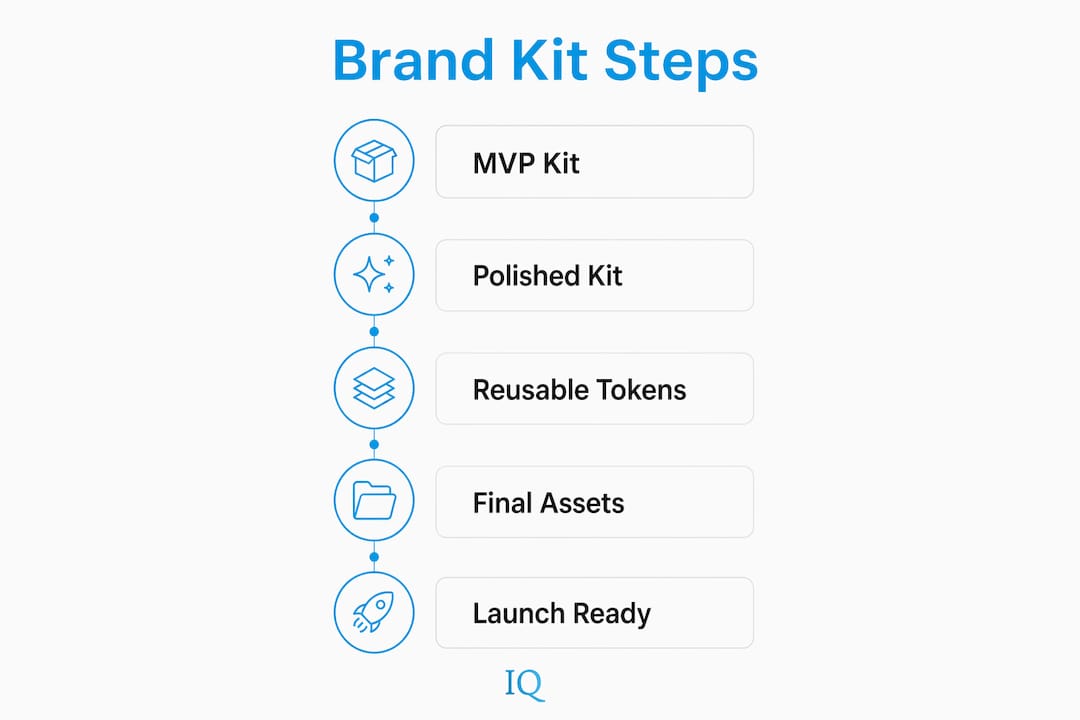
MVP kit: logo suite, color tokens, typography tokens, one-page mini-guide. Ready quickly. Polished kit: full token set, Figma file, extended guidelines with usage examples. Plan for a detailed, multi-day effort.
What does a brand kit cost, and how long does it take?
The honest answer: an AI-generated draft takes minutes. A production-ready, legally verified kit takes days.
- Free or basic tiers — instant drafts, limited export formats, often no vector or token output
- Pay-per-kit or credits — one-time fee for a full export; good for founders who need one kit fast
- Subscription models — unlimited kits and iterations; worth it if you’re building multiple products or refreshing often
- Agency comparison — a traditional branding agency charges thousands of dollars and takes weeks; an AI generator with human review gets you 80% of the result in a fraction of the time
Red flags to avoid: any generator that only exports flattened images, skips editable vectors, or has no token output. Those gaps translate directly into rework costs when you need to resize a logo or update a color across 40 templates.
Generator vs. designer: which path is right for you?
Use a generator when you need speed, cost efficiency, and direct integration with AI execution tools. Hire a designer when the brand strategy is complex, the industry is regulated, or the positioning requires deep research and bespoke naming.
Generator path — pros and cons:
- ✅ Fast: draft kit in hours, not weeks
- ✅ Affordable: fraction of agency cost
- ✅ AI-ready: token exports plug into automation
- ❌ Limited bespoke strategy and nuanced art direction
- ❌ May produce generic results without strong input
When to hire: complex product brands, healthcare or finance (where visual trust signals carry regulatory weight), or when you need a naming system and brand narrative built from scratch.
The practical hybrid: generate your initial kit with AI, validate it in one real campaign, then bring in a designer to refine the token narrative and long-term guidelines. Web design and branding work best when the foundational token system is already solid — a designer refining a structured kit moves faster than one starting from nothing.
Why Vora IQ is the recommended path for solo founders
Vora IQ combines brand kit creation with specialist AI agents — Sarrif for design, Axis for planning, Forge for product — so your brand assets feed directly into execution, not just a folder on your desktop.
- Single workspace: every token, asset, and roadmap lives in one place
- Token exports: generate JSON and CSS variables that connect to content and ad tools
- Execution integration: brand rules flow automatically into social posts, pitch decks, and product specs
- Sarrif handles design that builds trust before you say a word; Axis turns your brand strategy into an executable plan
With over 2,400 roadmaps and insights delivered across industries, Vora IQ’s track record shows what happens when brand creation and execution live in the same system. You move faster, stay consistent, and spend less time rebuilding assets from scratch.
Key Takeaways
An AI brand kit generator is only as useful as the token system and workspace behind it — prioritize editable vectors and machine-readable exports over visual polish.
| Point | Details |
|---|---|
| Insist on editable vectors and tokens | SVG logos and JSON tokens are non-negotiable; flattened images create rework costs. |
| Build a single source-of-truth workspace | Store all assets and tokens in one versioned project so every tool pulls from the same rules. |
| Validate with a real deliverable | Test the kit by generating a landing hero and one social post before calling it final. |
| Start MVP, then polish | Lock colors and type tokens first; iterate logos and imagery once core tokens are stable. |
| Use Vora IQ for integrated execution | Vora IQ connects brand kit creation to specialist agents and roadmaps in one workspace. |
The brand kit is your execution foundation
Most founders treat a brand kit like a graduation ceremony — something you do once and frame on the wall. That’s the wrong mental model. Your kit is infrastructure. The moment you export tokens and connect them to a content agent or ad builder, the kit starts doing work for you.
The AI handles the production speed. What it can’t do is decide whether your brand actually fits the market you’re entering. That’s your call. Run the checklist, generate one real asset, and trust your read on whether the result feels right. If it doesn’t, adjust the tokens — not the whole kit.
Founders who ship fast don’t have perfect brands. They have consistent ones. A structured kit with clear tokens and a single workspace gives you that consistency from day one, even when you’re the only person on the team.
Vora IQ gets your brand into production fast
Your brand kit shouldn’t sit in a folder. It should be working — generating on-brand social posts, feeding your pitch deck, and guiding every asset your business produces. Vora IQ makes that connection real.
Sign up, run the brand kit flow or paste your site URL, and let Sarrif generate your initial visual directions. Lock your core tokens, then connect them to Echo for social content and Axis for your execution roadmap. The whole loop — brand to plan to publish — runs inside one workspace. No agency retainer, no disconnected tools, no starting from scratch every time you need a new asset.
See how Vora IQ works and run your first brand kit generation today.
Useful sources for deeper reading
These resources support the workflows, formats, and best practices covered above.
- Adobe Express Brand Kit — official documentation on core brand kit components including HEX/RGB palettes and asset centralization
- AIDesigner Brand Kit Generator — demonstrates the 3-step AI workflow (input → variants → expand into kit) and token-based brand system generation
- brnd.ink AI Brand Kit Generator — shows expected editable vector and token outputs; good reference for what a quality export looks like
- Mavic AI Brand Kit — explains AI-compatible brand kit structure and how tokens enable automated brand rule application
- Branda — demonstrates URL-seeding workflow and single source-of-truth packaging with organized ZIP exports
- Glyph Brand System Generator — production-ready code output including CSS variables and typography scale; useful for developer-side token reference
- AI Content Brief Generator — shows how structured brand tokens connect to content briefs and automated content workflows
| Source | Best For |
|---|---|
| Adobe Express | Core component checklist and HEX/RGB palette setup |
| AIDesigner | 3-step workflow reference and kit expansion logic |
| brnd.ink | Editable vector and token export standards |
| Mavic AI | AI-compatible tokenization and automated brand rules |
| Branda | URL-seeding workflow and ZIP packaging structure |
| Glyph | CSS variables and developer-ready code output |