
What Is a Customer Feedback System and How Do You Build One?
By Vora IQ Team
Learn how to establish a successful customer feedback system that drives action and enhances customer engagement. Start effectively today!
- customer feedback system

A customer feedback system is the end-to-end process a business uses to collect customer input, route it to the right people, and turn it into action, not just a survey tool sitting unused in a dashboard. If you’re starting from zero, don’t try to build the whole thing at once. Pick one touchpoint, like a post-purchase email or an in-app prompt, and build a closed loop around it: ask, route, act, and follow up with the customer who spoke up.
This guide walks through the full lifecycle so you can build a program that actually holds together:
- The lifecycle stages and where most teams break down
- Which channels fit which moments, with response-rate benchmarks
- How AI-assisted analysis speeds up routing without losing accuracy
- The KPIs that tell you whether the loop is actually closing
Key Takeaways
A customer feedback system only works when collection, routing, and loop closure are governed as one continuous process, not treated as separate tools.
| Point | Details |
|---|---|
| Start narrow | Build one closed-loop workflow for a single touchpoint before expanding to a full program. |
| Match channel to moment | Use SMS for post-event asks (40–50% response) and save email surveys for periodic checks (6–15%). |
| Assign a single owner | Loop closure fails most often when no one person is accountable for follow-through. |
| Track three KPIs | Aim for 85%+ loop-closure rate, under 48 hours time-to-action, and under 90 days feedback-to-feature velocity. |
| Automate the busywork | Vora IQ’s AI teammates cluster feedback themes and turn them into roadmap tasks without manual routing. |
Table of Contents
- What a Customer Feedback System Actually Does
- Which Channels Work Best for Collecting Customer Feedback
- How Do You Design Questions People Will Actually Answer?
- How AI Helps You Analyze and Route Feedback Faster
- Which Framework Should You Use to Prioritize Feedback
- Building the Right Tech Stack Without Overbuying
- Why Do Feedback Programs Stall After Launch
- How Vora IQ Fits Into a Closed-Loop Feedback Program
- What Actually Makes a Feedback Program Stick
- Turn Feedback Into Roadmap Items Without Hiring an Analyst
- Sources
What a Customer Feedback System Actually Does
A working feedback system moves through seven stages: collect, organize, analyze, prioritize, act, close the loop, and measure. Skip any one of them and the whole thing degrades into a survey tool nobody checks.
Collect is the part everyone gets right. You send the survey, embed the widget, trigger the SMS. But collection without a receiving process is just noise generation. Organize means every response lands somewhere structured, tagged by source, customer segment, and topic, rather than scattered across spreadsheets, help desk tickets, and app store reviews. Analyze turns raw text into themes and sentiment. Prioritize ranks those themes against effort and impact. Act means someone actually does the work. Close the loop means the customer who gave feedback hears back. Measure means you track whether the whole system is speeding up or stalling.
Here’s the sequence most teams miss:
- A response comes in and gets tagged automatically by channel and topic.
- It’s deduplicated against similar recent feedback.
- It’s routed to the owning team with full context attached.
- The team acts within a defined service level agreement.
- The customer gets a follow-up message, even a brief one.
- The resolution gets logged against the original feedback item.
Feedback management works as an end-to-end business process, and governance determines whether that process holds up under volume. That means naming one owner for loop closure, not a committee, and defining service level agreements per feedback type so bug reports and feature requests don’t sit in the same slow queue.
Pro Tip: Assign a single named owner for loop closure before you assign anyone to build or buy a tool. Ownership fixes more broken feedback programs than software ever does.
Which Channels Work Best for Collecting Customer Feedback
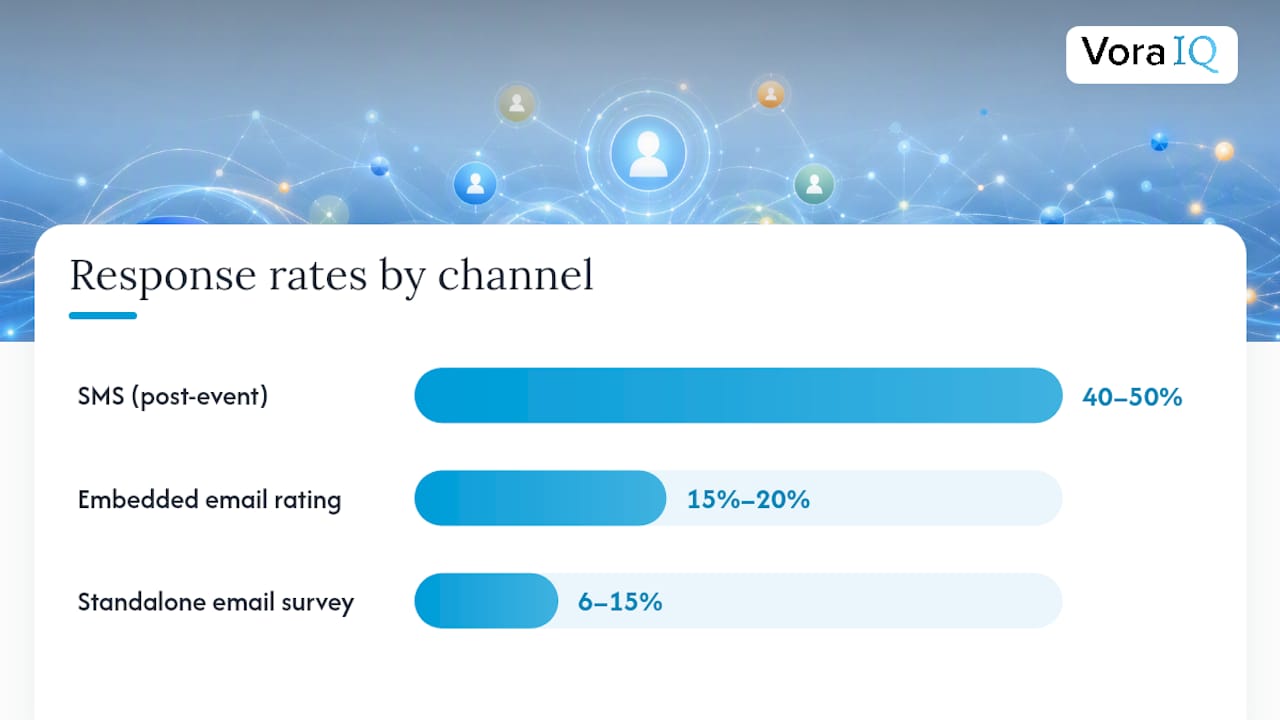
Channel choice is the single biggest lever on response rate, bigger than question design or incentive. Match the channel to the moment, not the other way around.
Text messages sent right after a meaningful event, like a completed service call or a delivered order, average 40 to 50 percent response rates. Emailed survey links, by contrast, typically land between 6 and 15 percent. That gap alone should reshape how most teams design their outreach.
| Channel | Typical response rate | Best use case |
|---|---|---|
| SMS (post-event) | 40–50% | Transactional moments: delivery, service call, appointment |
| In-app prompt | Moderate response rate | Feature usage, onboarding milestones |
| Embedded email rating | 15%–20% | Post-purchase, subscription renewal |
| Standalone email survey | 6–15% | Periodic relationship or satisfaction checks |
| Post-call/IVR | Varies by industry | Support interactions, immediate resolution feedback |
| Social listening/reviews | N/A (passive) | Brand sentiment, competitive positioning |
Timing matters almost as much as channel. Requests sent Tuesday through Thursday, mid-morning in the customer’s local time, tend to outperform other windows by a modest but consistent margin. The rule of thumb: trigger the ask off the event, not the calendar.
- Use event-triggered surveys for transactional moments (a delivery, a support ticket closing).
- Use calendar-based surveys sparingly, mainly for relationship health checks like quarterly satisfaction reviews.
- Use conversational formats, chat-based or SMS follow-up, when you need the reasoning behind a score, not just the number.
- Treat reviews and social mentions as a channel to monitor, not one you control the cadence of.
Static forms are efficient but shallow. When you need to understand why a customer rated something low, a two-way conversational exchange gets you there faster than a follow-up email ever will.
How Do You Design Questions People Will Actually Answer?
Short beats thorough almost every time. A single-question ask, “How was your delivery today?”, works better right after a transactional moment than a five-question form, because response rates drop sharply with every additional field.
Reserve longer formats for moments when you genuinely need depth. A score-plus-text pattern, “Rate this 1 to 5, then tell us why,” gives you both a trackable metric and the context to act on it. Use this after larger commitments: contract renewals, onboarding completion, a significant support escalation.
Sampling matters more than most teams realize. Surveying every customer, every time, trains people to ignore your requests. Trigger surveys off meaningful events for a subset of your customer base, and reserve full-population outreach for periodic checks like annual satisfaction reviews.
- Match the ask length to the moment: one question for transactional events, three to five for relationship checks.
- Trigger on events (a completed order, a resolved ticket) rather than a fixed schedule for most feedback.
- Rotate which customer segment gets surveyed each period if you’re running frequent transactional asks, to avoid fatigue.
- Get explicit opt-in before texting customers, and always include an easy opt-out; SMS regulations in the U.S. (TCPA) treat consent as a legal requirement, not a courtesy.
- Store consent records alongside contact data so your compliance posture is auditable.
Pro Tip: If a survey takes more than 90 seconds to complete, you’ll lose a meaningful share of respondents before the last question. Time yourself reading it out loud.
Design for the “why,” not just the “what.” A conversational format that follows up on vague answers surfaces the actual complaint instead of a number you have to guess at later.
How AI Helps You Analyze and Route Feedback Faster
Manual tagging doesn’t scale past a few hundred responses a month, and most growing businesses blow past that within a year. AI-assisted analysis closes that gap by clustering similar responses, flagging duplicates, and tagging sentiment automatically, work that used to take a full-time analyst days to complete.

Modern AI-powered text analysis can compress a multi-week manual review into a matter of hours, which changes how fast a team can act on emerging patterns. That speed only pays off if a human still reviews the output before it drives decisions. AI is strong at surfacing candidate themes; it’s weaker at understanding nuance and business context, so treat its suggestions as a draft, not a verdict.
Every routed item needs structured context attached, not just a category tag. A bug report should carry reproduction steps, the environment it occurred in, and the customer’s account impact, so engineering can act without a round of clarifying questions that stalls the whole handoff.
- Cluster similar feedback automatically, then have a human confirm the grouping before it drives a roadmap decision.
- Flag duplicate reports so five customers describing the same bug don’t create five separate tickets.
- Tag sentiment (frustrated, neutral, delighted) to help teams triage urgency, not just topic.
- Attach customer metadata (plan tier, account age, lifetime value) so high-value accounts get faster attention.
Automation and speed: Route urgent complaints as real-time alerts to the relevant team. Operational issues (bugs, service failures) should hit an engineering or support tracker within 48 to 72 hours. Save monthly digest reports for strategic themes that inform quarterly planning rather than daily firefighting. Tools built for AI-assisted classification can shorten this cycle considerably for teams without a dedicated analyst.
Which Framework Should You Use to Prioritize Feedback
Not every piece of feedback deserves the same response speed, and picking the wrong prioritization framework wastes more time than picking none at all.
RICE (Reach, Impact, Confidence, Effort) works well once you’ve deduplicated similar requests and need to rank them numerically against limited engineering capacity. ICE (Impact, Confidence, Ease) is a faster, rougher version, useful for smaller teams that don’t need the precision RICE demands. MoSCoW (Must, Should, Could, Won’t) suits release planning, where you’re deciding what ships this cycle versus next. Kano works best when you’re trying to distinguish “delighters” from baseline expectations, particularly useful for product teams debating what differentiates their offering.
Whichever framework you pick, three metrics tell you whether the whole system is healthy:
- Loop-closure rate: the share of feedback items where the customer got a follow-up. Target 85 percent or higher.
- Time-to-action: how fast high-priority items move from flagged to addressed. Under 48 hours for urgent issues is the benchmark worth chasing.
- Feedback-to-feature velocity: how long it takes a validated request to reach a shipped feature, ideally under 90 days for anything prioritized.
A typical workflow: feedback gets deduplicated, scored with RICE, and reviewed in a biweekly triage meeting. Items that clear the bar get logged against the roadmap, and the requesting customers get notified when the work ships. Connecting these themes to behavioral data, like cohort-level usage patterns, helps you confirm a request actually matters to a meaningful segment before you commit engineering time to it.
Building the Right Tech Stack Without Overbuying
Most early-stage teams overbuild their feedback stack before they’ve proven the process works. Start lean: a lightweight collection widget or survey tool, a unified inbox that pulls responses from every channel into one place, and a way to push actionable items into whatever your engineering or support team already tracks work in.
The integration checklist matters more than the tool list. Every routed item needs a customer identifier, the source channel, a timestamp, and enough context (screenshots, account details, prior interaction history) that the receiving team doesn’t have to chase down basics before acting.
- Confirm your collection tool can trigger off events, not just time-based schedules.
- Verify your inbox deduplicates across channels (a customer who emails and then texts about the same issue shouldn’t create two tickets).
- Check that routing includes required metadata fields, not just a free-text note.
- Make sure closing the loop is a tracked action, not an assumed one.
| Team size / stage | Spreadsheet + manual routing | Dedicated feedback platform |
|---|---|---|
| Solo founder, under 50 monthly responses | Sufficient short-term | Overkill initially |
| Small team, 50–300 monthly responses | Breaks down fast | Worth adopting |
| Scaling team, 300+ monthly responses | Not viable | Necessary |
A narrow pilot, routing just one feedback category (bugs, for instance) properly into your engineering tracker, teaches you the required fields and automation patterns before you commit to a full platform rollout.
Why Do Feedback Programs Stall After Launch
Most programs don’t fail at launch. They fail three months in, when the initial enthusiasm fades and nobody owns the follow-through.
The most common cause: no single person is accountable for closing the loop, so feedback piles up in a queue everyone assumes someone else is handling. A close second is tool silos, where support tickets, survey responses, and app reviews live in three disconnected systems that never talk to each other, making a unified view impossible. Many organizations are effective at collecting feedback but weak at converting it into actual product or experience changes, and that gap is almost always a governance failure, not a data problem.
- Assign one owner for loop closure, even in a two-person company.
- Automate status notifications so customers hear back without someone manually drafting each message.
- Standardize routing templates so every team receives feedback in the same structured format.
- Run a monthly audit of unresolved items older than your service level agreement to catch what’s slipping through.
Pro Tip: If feedback has gone quiet for more than a month, don’t assume things improved. Pull your last 90 days of raw responses across every channel and check for a backlog hiding behind the silence.
How Vora IQ Fits Into a Closed-Loop Feedback Program
For solo founders without a team to build this manually, an AI-native operating system can absorb the analysis and routing work that usually requires a dedicated analyst. Vora IQ’s specialist AI teammates map directly onto the lifecycle stages that trip up early-stage founders: pattern recognition across scattered feedback, drafting the roadmap items that follow, and keeping daily execution tied back to what customers actually said.
- Feedback themes feed into adaptive roadmap updates instead of sitting in a spreadsheet no one revisits.
- Market and competitor analysis features contextualize whether a request is a genuine gap or noise.
- Task automation turns a prioritized theme into an assigned action without a manual handoff.
This works best when you’re the one closing the loop and need the busywork of tagging and routing automated, not when you already have a dedicated customer experience team running enterprise-scale volume. Vora IQ has generated over 2,400 unique roadmaps across industries, structured guidance built for founders operating without the overhead of a full team.
What Actually Makes a Feedback Program Stick
Most founders overbuild the tooling and underbuild the habit. A minimum viable closed-loop program takes about 90 days: the first month picking one channel and one touchpoint, the second building the routing and follow-up habit, the third measuring loop closure and fixing whatever’s leaking.
The cultural work matters more than the software. If engineering doesn’t see a bug report with real customer impact attached, it gets deprioritized, no matter what tool routed it. Automate the tagging and the alerts first. Automate prioritization decisions last, once you trust the data feeding them.
Scale the program only after loop closure holds steady above your target for a full quarter, not the first good month.
— Khalel
Turn Feedback Into Roadmap Items Without Hiring an Analyst
Building the lifecycle described above by hand, tagging, deduplicating, routing, and tracking loop closure, is exactly the kind of repetitive operational work that eats a solo founder’s week. Vora IQ was built for founders in that exact position: instead of manually sorting through scattered feedback, you get AI-driven analysis that clusters themes, flags what’s urgent, and feeds directly into your adaptive roadmap.
Every feature, from market analysis to daily task automation, is tailored to your specific business context, so a piece of customer feedback doesn’t just get logged. It becomes a prioritized task tied to your actual roadmap, with the busywork of routing and tracking handled automatically. If you’re weighing Vora IQ against other planning tools, the product comparison page breaks down where it fits. Right now, Cohort 2 gives 50 founders 60 days free to evaluate whether this approach fits how you work. Check if a spot is still open.
Sources
- How to Ask for Customer Feedback: Timing, Channels, and Templates | Perspective AI
- Customer Feedback Management: Build a System That Scales
- Customer Feedback Management: A Practical Process
- Customer Feedback Management: Complete Guide for 2026