
Build a Startup Social Media Calendar in 90 Minutes
By Vora IQ Team
Build a founder-ready social calendar in one focused session. Pick 3–4 pillars, schedule the first two weeks, batch creation, and automate posts with Echo.
- startup social media calendar

A startup social media calendar is a 30 to 90 day planner built from 3 to 4 content pillars, a cadence you can actually sustain, and a weekly batching workflow. Build it in one focused session: pick your pillars, choose a horizon, map your milestones, and schedule the first two weeks. The templates and the 30-day example below show exactly how.
TL;DR:
- Most startups only need nine key fields in their social media calendar to streamline management and avoid unnecessary complexity.
- Building a effective calendar in 90 minutes to two hours involves selecting three to four pillars, mapping milestones, and scheduling content for two weeks.
- Maintaining a sustainable posting cadence is crucial, with recommended frequencies like once daily on LinkedIn, 1-2 times a day on Instagram, and a few times a week on TikTok.
- Automating repetitive tasks such as resizing and using AI-generated drafts helps keep content creation efficient and focused on authentic voice.
- Fitting trending topics into the calendar requires reserving unassigned slots for reactive posts and empowering a single person, usually the founder, to post without delays.
Table of Contents
- What Is a Startup Social Media Calendar (And Why It’s Worth Building)?
- What Fields Belong in Your Calendar Template?
- How Do You Build a Startup-Ready Calendar in One Sitting?
- What Does a Sample 30-Day Calendar Look Like?
- How Often Should Startups Post on Each Platform?
- Which Tools Should Handle Your Calendar, and Which Shouldn’t?
- How Vora IQ and Echo Turn a Calendar Into Scheduled Posts
- What’s the 30-Day Launch Checklist and Monthly Review?
- How Do You Fit Trending Topics Into a Planned Calendar?
- How Should You Split Calendar Ownership Across a Small Team?
- Why Most Startup Calendars Fail Within a Month
- Turn Your Calendar Into Content Without the Manual Grind
- Sources
What Is a Startup Social Media Calendar (And Why It’s Worth Building)?
A social media calendar is the tactical layer that sits under your broader strategy. Your strategy answers why you’re posting and who you’re talking to. The calendar answers what, when, and where, row by row. Confusing the two is why so many founders either overplan (a 40-page strategy doc, zero posts published) or underplan (posting whatever comes to mind at 11 p.m.).
For a founder wearing eight hats, the calendar earns its keep fast:
- It turns “we should post about the launch” into a scheduled Tuesday post with a caption already written.
- It aligns social content with product milestones instead of drifting a week behind them.
- It makes performance visible, so you can see which content pillar actually drives signups.
- It lets you reuse and repurpose one good idea across a month, instead of starting from zero daily.
Startups that treat their calendar as a repurposing engine rather than a content factory scale output without a large team, as explained in the guide to SEO for SaaS companies.
What Fields Belong in Your Calendar Template?
Skip the templates with 40 columns. Most startups only need nine fields to run a functional calendar, and the extras just create friction you’ll abandon by week two.
The essential columns:
- Date — the scheduled publish date, not the creation date.
- Platform — LinkedIn, Instagram, X, TikTok, whatever applies.
- Pillar — which content theme this post belongs to.
- Format — video, carousel, text post, image.
- Caption — the actual copy, drafted ahead of time.
- CTA — what you want the viewer to do next.
- Asset link — where the image, video, or file lives.
- Status — draft, scheduled, published.
- Owner — who’s responsible if something breaks.
This exact structure mirrors what most template providers recommend, because it’s the minimum that keeps a small team from losing track of anything.
If you’re further along, add three optional fields: a milestone tag (linking a post to a launch or fundraise), a repurpose plan (where else this asset gets reused), and a priority flag for launch-critical content.
Pro Tip: Add the milestone tag column even if you think you don’t need it yet. The moment you have a launch, a demo day, or a funding announcement, you’ll want every related post grouped and searchable in one filter.
How Do You Build a Startup-Ready Calendar in One Sitting?
You don’t need a retreat or a marketing hire to get this running. One focused session, ideally 90 minutes to two hours, gets you a working calendar and your first two weeks of scheduled content.
- Pick your horizon. Start with a 30-day plan. It’s short enough to finish, long enough to gather real performance data, and it sets you up to graduate to 90-day quarterly cycles once you see what works.
- Choose 3 to 4 content pillars. Good starter pillars: building in public, product updates, user stories, and quick education posts relevant to your space.
- Set a cadence you can actually hold. Three solid posts a week beats seven mediocre ones that burn you out by day ten.
- Map your milestones. Drop launch dates, demo days, and campaign windows straight into the calendar before you fill in routine content.
- Assign owners and batching slots. Even a two-person team needs to know who writes, who designs, and when the batch session happens.
- Schedule your first week or two. Don’t wait for the full month to be perfect. Get posts live and start learning.
What Does a Sample 30-Day Calendar Look Like?
Here’s a simple week-by-week theme structure you can copy directly, built around four rotating pillars distributed across whichever platforms you’re actually active on.
| Week | Theme focus | Primary pillar | Suggested platforms |
|---|---|---|---|
| Week 1 | Introduce the problem you solve | Building in public | LinkedIn, X |
| Week 2 | Show the product in motion | Product updates | Instagram, TikTok |
| Week 3 | Feature a real user or use case | User stories | LinkedIn, Instagram |
| Week 4 | Teach something useful | Education | X, LinkedIn |
For the template format itself, three layouts work well depending on how your brain organizes information: a spreadsheet for anyone who thinks in rows and filters, a visual calendar for anyone who needs to see gaps at a glance, or a Kanban board for teams tracking draft-to-published status. Template providers like Canva publish starter versions of all three, so pick whichever you won’t abandon in two weeks.
The weekly rhythm that keeps this sustainable:
- Plan (60 to 90 minutes): review the week ahead, adjust for anything trending or urgent.
- Batch create (3 to 6 hours): film, write, and design in one block rather than daily.
- Schedule (30 to 60 minutes): load everything into your scheduler for the week.
- Monitor: check engagement daily, but don’t let it eat your batching time.
How Often Should Startups Post on Each Platform?
Forget the enterprise cadence charts built for teams with five content people. Startups need conservative, sustainable ranges that won’t collapse the moment you hit a busy product week.
Starter cadence by platform:
- LinkedIn: about once a day or less, prioritizing quality founder insight over volume.
- Instagram: 1 to 2 posts a day if you can sustain it, but 3 to 4 times a week is a perfectly fine start.
- TikTok: 1 to 4 times a day is the aggressive end; most startups do well posting a few times a week and repurposing hard.
- X: higher frequency tolerates more, but quality still beats spam.
These ranges reflect platform-specific guidance that treats posting frequency as a range to grow into, not a fixed rule to hit from day one.
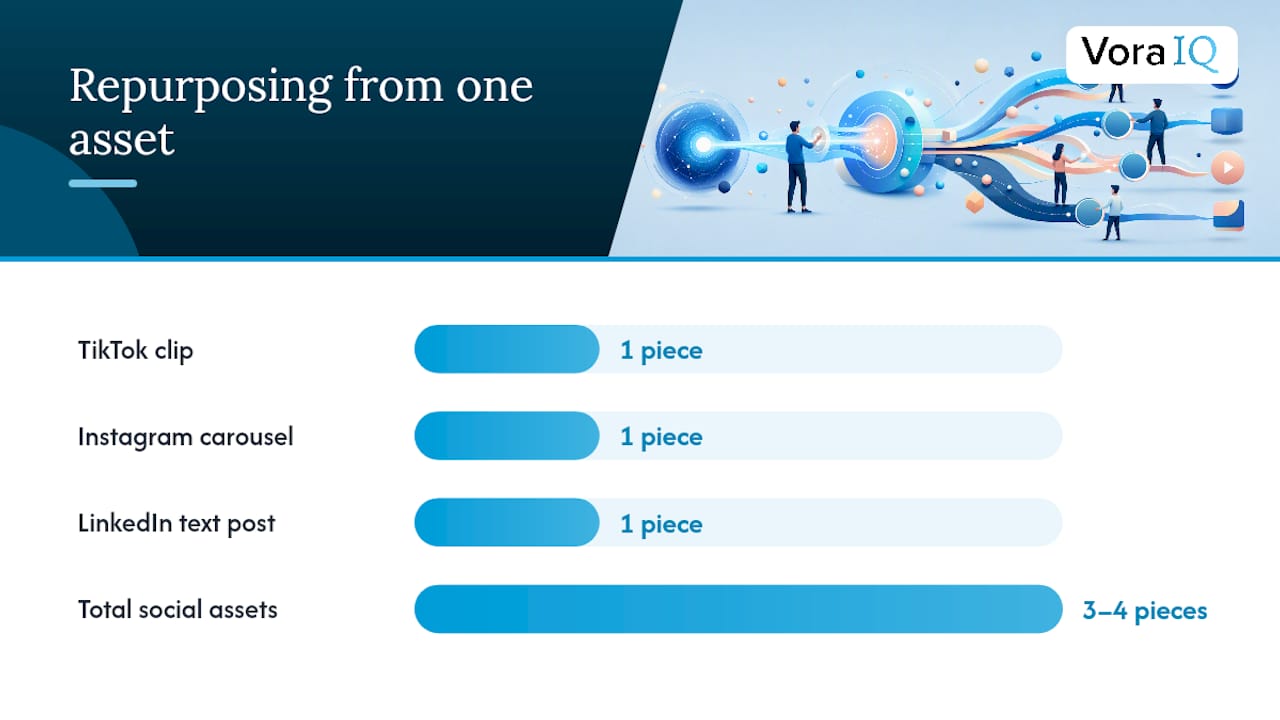
The repurposing math is what makes any of this sustainable. One core asset, say a two-minute founder video, becomes a TikTok clip, an Instagram carousel of key quotes, and a LinkedIn text post built from the transcript. That’s three to four pieces of content from one creation session.
Watch three signals before increasing frequency: engagement rate holding steady or climbing, follower growth accelerating, and click-through to your site actually converting. If none of those move after a month, more posts won’t fix it. Better pillars might.
Which Tools Should Handle Your Calendar, and Which Shouldn’t?
Startups generally need five categories of tools: a template or planning document, a scheduler, an AI content generator for drafts, a resizing tool for cross-platform formats, and basic analytics.
Automate the mechanical parts. Scheduling, resizing images for different platforms, and generating first-draft captions are exactly the tasks AI-assisted content generation handles well, freeing your time for the parts that actually need a founder’s voice.
Keep launch announcements, personal stories, and anything tied to fundraising or a big product moment written by you. That’s where authenticity reads through, and where an AI-generated draft tends to sound flat.
Connect your calendar to your publishing tool and your task system early. A scheduler built for solo founders that pulls directly from your calendar removes the manual copy-paste step that quietly kills most calendars by week three.
Pro Tip: If you only automate one thing this month, automate resizing. It’s the task most likely to eat 20 minutes per post for zero strategic benefit.
How Vora IQ and Echo Turn a Calendar Into Scheduled Posts
Most calendar advice stops at the template. The harder problem is keeping the calendar filled without turning content creation into a second job. This is where an AI-native system built specifically for solo founders changes the math.
Vora IQ maps product milestones directly into content generation. When you log a launch date or a roadmap update inside your adaptive roadmap, that milestone can feed straight into calendar ideas instead of living in a separate doc you forget to check. Echo, Vora IQ’s social media agent, generates and schedules content built from your actual business context rather than generic prompts.
- Milestone tracking connects roadmap updates to calendar entries automatically.
- Echo drafts platform-specific posts from your product and audience data.
- Task automation handles scheduling so you’re not manually loading a calendar every Sunday.
Building an agent that actually understands a founder’s business, not just their prompt, means it has to know the roadmap, the audience, and the milestone before it writes a single caption.
Vora IQ has generated over 2,400 unique roadmaps across different industries, and that same contextual approach is what lets Echo turn a milestone entry into a scheduled post without you rewriting it from scratch.
What’s the 30-Day Launch Checklist and Monthly Review?
Getting the calendar live matters more than getting it perfect. Here’s the sequence.
- Day 0: finalize your 3 to 4 pillars, pick your template format, and schedule 7 to 14 posts to cover your first two weeks.
- Set up monitoring: connect basic analytics so you’re not manually checking four apps daily.
- Weekly routine: batch create, schedule the week ahead, monitor engagement, and reply to comments as they come in.
- End of month: run your review.
The monthly review doesn’t need to be complicated. Look at three numbers, three content types, and one decision.
| Review item | What to check | Decision it drives |
|---|---|---|
| Top 3 KPIs | Engagement rate, follower growth, click-throughs | Whether cadence needs to shift |
| Content winners | Which pillar and format performed best | What to repurpose and double down on |
| Cadence fit | Did you actually hit your planned posting schedule | Whether to adjust frequency for next month |
Treat the first 30 days as a test, not a final answer. Expand into a 90-day quarterly rhythm once you know which pillar is pulling weight.
How Do You Fit Trending Topics Into a Planned Calendar?
The fix isn’t choosing one. It’s building room for both.
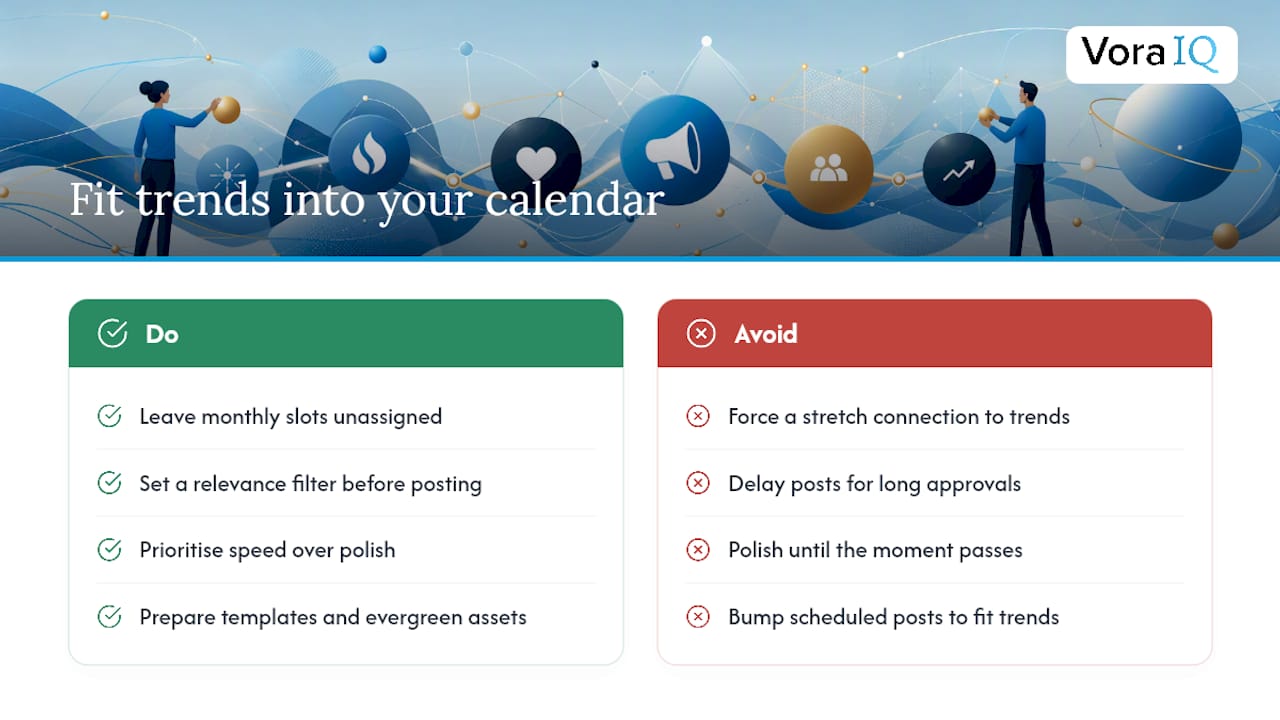
Leave a portion of your monthly slots open, unassigned to any specific topic. That’s your reactive buffer. When something relevant breaks, an industry shift, a competitor stumble, a viral moment in your niche, you have space to jump in without bumping a scheduled post you already wrote.
Set a simple filter before you post anything trend-related: does this connect naturally to one of your existing pillars? A trending AI story fits neatly into a “product updates” or “education” pillar if you’re in tech. A viral meme format doesn’t need to connect at all, sometimes a founder joining a lighthearted trend just humanizes the brand. But if you’re forcing a stretch connection just to justify jumping on a trend, skip it. Forced relevance reads worse than silence.
Speed matters more than polish for real-time content. A rough, timely take posted within hours beats a polished post that arrives three days after the moment has passed. Keep a rough asset library, a few branded templates, some evergreen product shots, ready so you can drop in text and publish fast instead of starting design from zero.
Assign one person the authority to post reactive content without waiting for a full team sign-off. In a two or three person startup, that’s usually the founder. Slow approval chains are exactly why most small teams miss trending windows entirely, even when they notice the trend in time.
Review your reactive posts in the same monthly check as your planned content. If real-time posts consistently outperform your scheduled pillars, that’s a signal to loosen your calendar structure, not proof the calendar failed.
How Should You Split Calendar Ownership Across a Small Team?
Even a two-person startup benefits from clear ownership, because “someone will post it” is exactly how calendars go three weeks without an update.
Assign roles by strength, not by title. The founder with the strongest voice usually owns launch announcements and founder-story content, since authenticity is hardest to delegate. Whoever’s most comfortable with design tools owns visual assets and resizing. If you have a third person, give them ownership of scheduling and monitoring, the operational glue that keeps the calendar from silently falling apart.
Use the owner column in your calendar seriously, not decoratively. Every row needs one name attached, not “team” or “TBD.” Ambiguous ownership is the single most common reason startup calendars die quietly: nobody feels personally responsible, so nobody notices when a post gets skipped.
Set a recurring batching slot on the calendar itself, not just a mental note. A shared 90-minute weekly block where whoever’s assigned that week’s content shows up to draft, film, or design keeps output steady without requiring daily check-ins.
For milestone-driven content, specifically, launches, funding news, product releases, loop in whoever owns that milestone internally, even if they don’t normally touch social. A product update captioned by the person who actually built the feature almost always reads more credible than a generic marketing voice.
Keep the review process light. A five-minute weekly sync, even async in Slack, on what got posted, what got skipped, and what’s coming next prevents the calendar from becoming a document nobody actually looks at after the first week.
Why Most Startup Calendars Fail Within a Month
The conventional advice treats social media calendars like enterprise marketing documents: exhaustive strategy decks, twelve-month editorial calendars, approval workflows built for teams that don’t exist yet. Founders read that advice, try to build it, and abandon the whole project by week two because it’s designed for a company with five people in marketing, not one person doing marketing between customer calls.
What the evidence here actually supports is smaller and more forgiving: a 30-day starter, three or four pillars, and a cadence you can hold without burning out. The batching data backs this up directly, teams that create content in focused blocks rather than daily scrambles produce more consistent output with less total effort. That’s the opposite of what most “content calendar” guides imply when they suggest daily creative work.
The biggest overrated idea in this space is frequency. Founders chase posting volume because it feels productive, but a sustainable three-post weekly cadence that actually gets a monthly review beats a seven-day cadence that collapses by week three. Prioritize finishing the loop, plan, batch, schedule, review, over maximizing output. A calendar you actually run for three straight months will outperform a perfect one you abandon after ten days.
— Khalel
Turn Your Calendar Into Content Without the Manual Grind
You’ve got the template, the pillars, and the cadence. The gap most founders hit next isn’t planning, it’s the weekly grind of turning a calendar row into an actual finished post, week after week, without a marketing hire to do it.
Vora IQ is built specifically for that gap. Instead of a generic scheduler that only handles publishing, Echo generates content drafts from your actual roadmap and product context, so your calendar fills with posts tied to real milestones instead of generic prompts you have to fix yourself. Because Vora IQ already knows your business context from your adaptive roadmap, a launch date or product update can flow straight into a scheduled post without you re-explaining your company every time you sit down to write.
This fits founders and small teams exactly like the ones this guide is written for: solo operators, early-stage teams, and bootstrapped startups who need structure without hiring a marketing department. Explore how solo founders and startup teams use Vora IQ to turn roadmaps into scheduled content, and start with a free Idea Report Card to map your next milestone into your first automated posts.