
Phase First, Copy Ready Product Launch Checklist for Founders & Teams
By Vora IQ Team
Copy a phase first product launch checklist into your project tool. Assign owners, wire tracking, and lock the go no go one week before launch.
- product launch checklist

Copy this checklist into your project tool today, assign an owner to each phase, and lock your go/no-go meeting for one week before launch. The work splits into four phases: pre-launch planning, product readiness, launch day operations, and post-launch measurement. The most urgent action isn’t a task at all. It’s naming who makes the final call and putting that decision on the calendar now.
TL;DR:
- Confirm success metrics are set with specific targets and identify the decision-maker for final launch approval at least one week in advance.
- Run comprehensive testing, including end-to-end user flows, third-party integrations, and rollback procedures with practiced simulations.
- Ensure all analytics, tracking, and dashboards are verified and functioning correctly before launch day to accurately measure performance.
- Finalize marketing assets and messaging, locking the core value proposition, landing pages, and rollout schedule before design and deployment.
- Develop detailed contingency plans for third-party outages, reputational issues, and resource collapses beyond just technical rollback procedures.
Vora IQTurn Your Launch Plan Into ActionVora IQ helps founders validate ideas, build actionable plans, and execute with adaptive roadmaps and task automation.Explore Vora IQ
Table of Contents
- Pre-Launch Checklist: Objectives, ICP, and Timeline
- Product Readiness and Testing Checklist
- Systems and Analytics Checklist
- Marketing and GTM Assets Checklist
- Sales and Support Enablement Checklist
- Launch Day Runbook: Minute-by-Minute Ops
- Post-Launch Measurement and Iteration
- Contingency Plans Beyond Rollback
- What Solo Founders Can Skip (And What They Can’t)
- Run Your Launch Checklist Without Doing It Alone
- Sources
Pre-Launch Checklist: Objectives, ICP, and Timeline
Most launches don’t fail on launch day. They fail three weeks earlier, when nobody agreed on what “success” actually means. Top launch frameworks treat this stage as a phase-based workflow with clear handoffs, not a loose pile of tasks assigned in a Slack thread.
Start by classifying the launch. A brand-new product needs the full checklist below. A feature update or minor release needs a lighter version. Userpilot’s execution playbooks specifically separate new product launches from feature launches, because running the heavyweight process on a small release burns time your team doesn’t have.
Here’s the sequence that actually holds up under pressure:
- Define success metrics before anything else. Pick two or three numbers: activation rate, day 7 retention, or conversion from trial to paid. Write the target next to each one, not just the metric name.
- Confirm your ICP and positioning in one sentence. If your team can’t agree on who the launch is for, every downstream asset will drift.
- Build a RACI chart and put names on it. Someone owns content, someone owns QA, someone owns analytics. No shared ownership, no orphaned tasks.
- Validate before you build momentum. Talk to a handful of real prospects, three early adopters minimum, before you commit marketing spend.
- Lock your milestone dates. Content freeze, QA sign-off, analytics wiring, and final leadership approval each need their own deadline, not a vague “before launch” note.
- Schedule the formal go/no-go meeting. Put it on the calendar now, name the decision-maker, and list required attendees. This is the single most skipped step in early-stage launches.
Pro Tip: Treat your go/no-go meeting like a real gate, not a status update. If the meeting has no power to actually stop the launch, it isn’t a gate. It’s theater.
Interactive checklists that live inside a connected workspace tend to outperform static spreadsheets here, largely because ownership stays visible as the plan shifts. A spreadsheet gets stale the moment someone forgets to update it.
Product Readiness and Testing Checklist
Technical debt doesn’t announce itself before launch. It shows up at the worst possible moment, usually during your highest-traffic hour. A structured go-live process closes most of that risk before it becomes a public incident.
Run through this before you touch the go/no-go meeting:
- Test critical user flows end to end, not in isolation. Sign-up, checkout, and onboarding need to work as one continuous path, not three separate demos.
- Check every third-party integration under load, including payment processors, email delivery, and authentication providers.
- Classify every known issue as blocker, high, medium, or low. Blockers stop launch. High-severity items need a documented workaround before go-live.
- Write a rollback plan and name who has authority to trigger it. Devcom’s go-live guidance treats rollback as a required checkpoint, not an afterthought, with UAT sign-off and monitoring baked into the readiness assessment.
- Verify environment isolation. Confirm staging and production configs actually match, and that test data isn’t leaking into live dashboards.
- Draft release notes and a short FAQ covering known issues, so support isn’t improvising answers on day one.
Pro Tip: Run your rollback plan as a dry run at least once before launch week. A plan nobody has practiced is just a paragraph in a document.
If you’re moving from an early prototype toward this stage, the jump from validated idea to a testable build is its own project. Going from validated idea to MVP without wasting months matters just as much as the launch checklist itself.
Systems and Analytics Checklist
You can run a flawless launch and still have no idea whether it worked, because nobody wired up tracking correctly. This phase is unglamorous and it’s exactly where launches quietly lose their measurement data.
Before publish day, confirm:
- UTM parameters are consistent across every channel, campaign, and creative variant. Inconsistent tagging is the number one reason launch attribution reports look wrong.
- Conversion events fire correctly in your analytics platform, and funnel steps match what actually happens on the page.
- Dashboards pass a smoke test. Load them the day before and confirm real data is populating, not placeholder numbers.
- Payment flows are verified end to end, including price display, tax calculation, webhook delivery, receipt emails, and refund handling if applicable.
- Monitoring and alerting are live. Set error thresholds, confirm APM tools are catching exceptions, and name a first responder for alerts.
- Every integration gets one final end-to-end test, tracing a single user from sign-up through billing to onboarding.
Run an initial sanity check shortly after publish to confirm dashboards receive live events and payment webhooks fire correctly. That hour tells you more than the next 24 will.
Marketing and GTM Assets Checklist
Marketing assets built in isolation from the product team almost always need last-minute rewrites. Lock the message before anyone touches design.
- Finalize the hero value proposition first. One sentence, tested against your ICP, approved before design work begins.
- Prep the landing page fully: headline, CTA copy, SEO metadata, social preview images, and form validation, plus tracking hooks tied to the UTM structure from the systems checklist.
- Assign owners and deadlines for every creative asset, including demo video, screenshot pack, social post series, and the email sequence.
- Build the exact publish schedule, down to the UTC time, sender identity for each email, and a backup message in case a channel goes down.
- Assemble the PR kit with boilerplate copy, founder quotes, approved assets, and clear embargo instructions for any press contacts.
A startup launch press release only works if the timing lines up with your product launch announcement email and social schedule. If any one of those three slips, the others lose their impact window.
Sales and Support Enablement Checklist
Your support inbox on launch day is not the place to improvise. Give both teams a minimum viable toolkit before launch week starts.
- Equip sales with a one-pager, a demo script, and a pricing cheat sheet that answers the five objections you already know are coming.
- Give support canned responses and an escalation matrix, plus a clear SLA for launch week specifically, since normal response times often won’t hold under launch traffic.
- Tag every launch-related ticket so you can pull volume and sentiment data later without digging through the whole queue.
- Run at least one training session with a recording, and keep a written log of questions asked, since half your team will miss the live session.
- Map the onboarding flow: trial activation, welcome email sequence, and first-run guidance inside the product itself.
Tools built for cross-team visibility, like the collaboration platforms covered in Gainable’s roundup of sales team tools, can cut down the back-and-forth between sales and support during launch week specifically.
Launch Day Runbook: Minute-by-Minute Ops
Launch day isn’t the time to figure out who’s doing what. That decision needed to happen days ago. What launch day needs is a script.
- One hour before publish, run your final checks: landing page loads correctly, tracking fires, payment sandbox test passes, and social assets are queued.
- Ten minutes before go-live, run a fast smoke test on the exact URL you’re about to publish. A short, focused sweep at this stage catches the majority of catastrophic launch mistakes, things like broken redirects or a stale cached page.
- At publish, assign a dedicated incident lead who does nothing else but watch dashboards and coordinate response.
- Immediately after, monitor error rates, payment success rates, and page load times against pre-set thresholds. If error rate crosses your threshold, that’s your rollback trigger, not a judgment call made in the moment.
- Assign shift coverage, not just for the first hour, but for the full day. Name who handles social replies, who watches payments, and who has backup contact info if the primary owner goes dark.
- Run post-publish verification on every critical flow one more time, live, not in staging.
Pro Tip: Write your internal status update template and customer-facing message template before launch day, not during it. Nobody writes clearly while also fighting a fire.
Post-Launch Measurement and Iteration
The work that happens between Day 0 and Day 90 determines whether your launch was a moment or a foundation. Userpilot’s execution playbooks specifically recommend distinct checklists for launch week versus the Day 1–90 window, because the questions you’re answering change completely once the initial spike settles.
- Day 0 to Day 1: watch activation rate, error rate, and payment success. These tell you if the product is functioning, not whether it’s succeeding.
- Day 7: check retention curves and early conversion data. This is your first honest signal on product-market fit.
- Day 30: report on revenue impact, churn signals, and support ticket themes. Patterns that looked like noise in week one often turn into real trends by now.
- Collect feedback through multiple channels: short user interviews, in-app surveys, and support ticket mining. Structured feedback programs, when acted on systematically, have been tied to meaningful revenue growth in growth research.
- Triage bugs by severity for the first 30 days, and convert repeat issues into prioritized backlog items rather than one-off fixes.
- Run a formal retrospective by Day 14. Go-live guidance recommends deciding explicitly at this checkpoint whether to proceed, iterate, or roll back, rather than letting the decision drift.
- Update your roadmap based on what you actually learned, and communicate the change to both your team and your customers.
If you’re tracking financial metrics through this window, understanding the difference between MRR and ARR will keep your post-launch revenue reporting honest instead of optimistic. And if early churn shows up, a structured 90-day retention playbook beats improvising fixes ticket by ticket.
Contingency Plans Beyond Rollback
Rollback covers one scenario: the new thing breaks and you revert to the old thing. Plenty of launch failures don’t fit that shape at all.
What happens if a payment processor has an outage that has nothing to do with your code? You need a pre-written customer communication and a manual fallback for processing orders, not a rollback button. What happens if a competitor announces a similar feature the same week and your PR angle suddenly reads as derivative? That needs a messaging pivot, decided in advance, not improvised at 9 a.m.
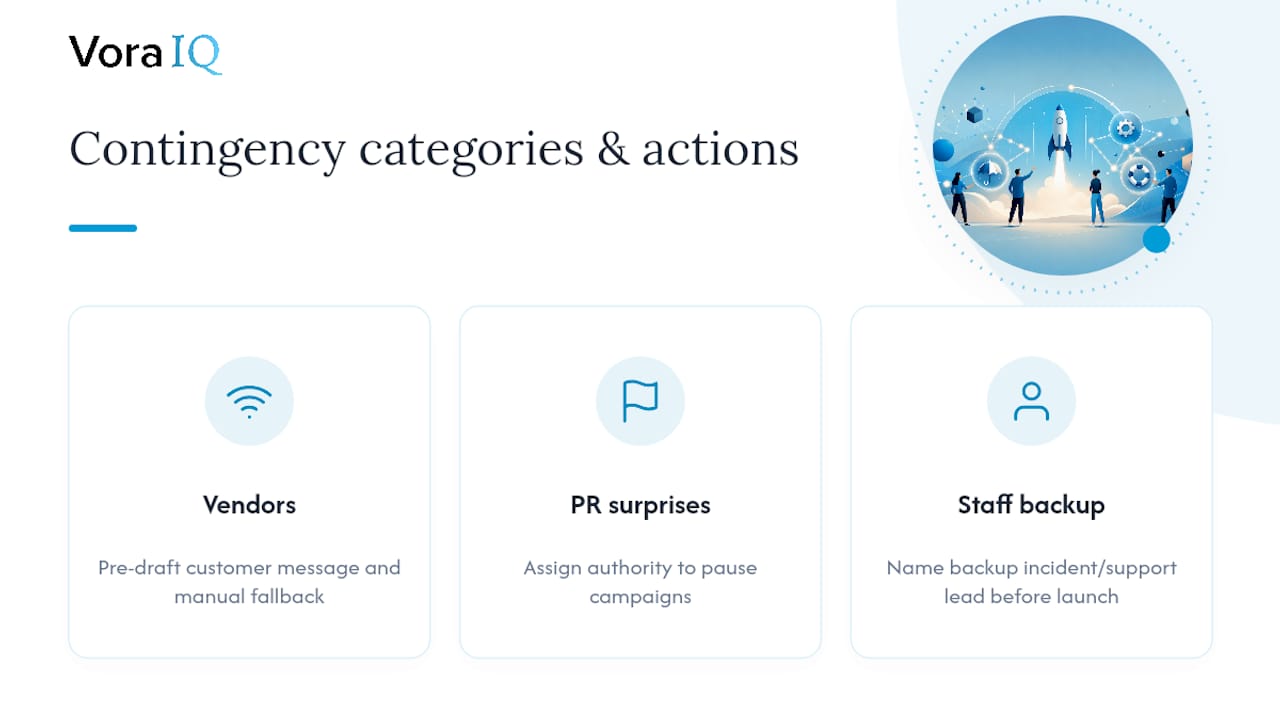
Build contingency plans for at least three categories beyond technical rollback:
Third-party outages. Identify which vendors, payment, email, hosting, authentication, could take you down through no fault of your own, and pre-draft the customer message for each.
Reputational or PR surprises. Decide who has authority to pause a scheduled campaign if news breaks that makes the timing look bad.
Resource collapse. If your incident lead gets sick or your support team gets overwhelmed by volume, name the backup person before launch week, not during it.
None of these show up in a standard rollback plan, but all three have killed launches that were otherwise flawless on the technical side. The checklist isn’t complete until it accounts for the failures that have nothing to do with your code.
What Solo Founders Can Skip (And What They Can’t)
Most launch guides assume a team of ten. If it’s just you, some of this checklist can compress without real risk.
Automate what you can: scheduling tools handle your publish-time coordination, and AI drafting tools can produce your release notes, FAQ, and social copy pack in a fraction of the time a full marketing team would take. Right-sizing the checklist to your launch scale isn’t cutting corners. It’s the correct call for a minor release.
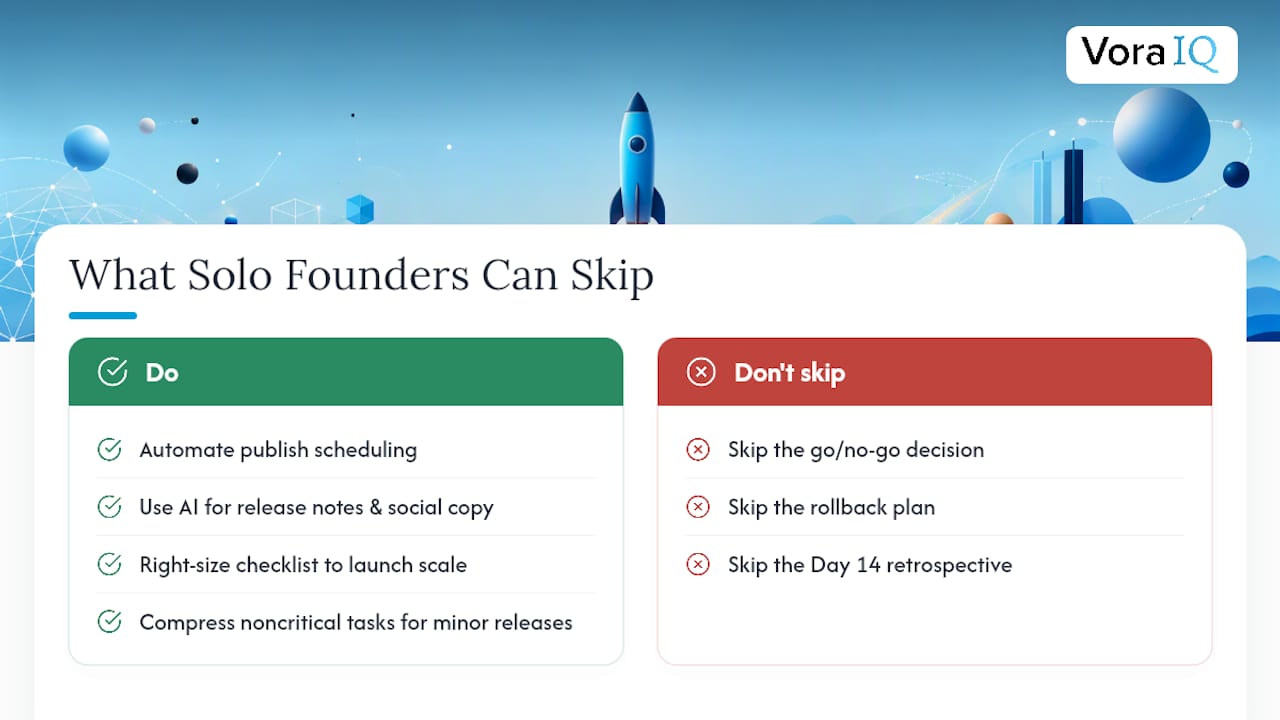
What you can’t skip, no matter how small your team: the go/no-go decision, the rollback plan, and the Day 14 retrospective. Those three gates catch the failures that actually end launches.
Many startups have found that skipping planning steps to save time usually results in longer delays fixing unexpected problems later.
— Khalel
Run Your Launch Checklist Without Doing It Alone
Some platforms offer routing, task automation, and content generation to help turn a launch checklist into actionable steps, with features like adaptive roadmaps and AI-assisted drafting of release notes, social posts, and go-to-market copy.
This fits best if you’re a solo founder or an early-stage team without a dedicated project manager watching every phase. You get the structure of a full launch team without the overhead of hiring one. If social comms are part of your launch plan, Echo can handle scheduling and content generation for that piece specifically, covered in more detail on the Echo product page.
See exactly how the roadmap and automation work together on the Vora IQ features page, and check whether Cohort 2 still has open spots if you want hands-on support during your launch window.
Sources
- Product launch checklist: Step-by-step guide (+ free templates)
- Product Launch Checklist for 2026: The Execution Playbook
- Go Live Checklist for Software Projects: Before & After Launch